




If you have ever wanted to drop onto an island with 99 other players, scramble for weapons, and outlast everyone to claim a Victory Royale, Fortnite is the game that defined that experience for a generation. Available on mobile devices, it brings the full console and PC experience to your phone or tablet, complete with building mechanics, seasonal events, and a creative mode where you can design your own islands. Whether you are a casual player looking for quick matches or a competitive grinder chasing ranked rewards, Fortnite on mobile offers something for almost everyone.
What Is Fortnite
Fortnite is a free-to-play online game developed by Epic Games that combines a battle royale shooter, a sandbox building system, and a creative mode in one package. It is designed for players who want fast-paced competitive matches as well as those who prefer exploring user-generated content and socializing with friends across devices.
How It Works
The core loop of Fortnite is straightforward: you join a match, land on the island, gather weapons and materials, and fight to be the last player or squad standing. Here is the basic flow:
- Select a mode - Choose between Solo, Duo, Squad, or limited-time modes from the main lobby.
- Drop onto the island - Ride the Battle Bus, pick a landing spot, and skydive to your chosen location.
- Loot and build - Search for weapons, shields, and materials. Harvest wood, brick, and metal from the environment to build ramps, walls, and forts.
- Survive the storm - The safe zone shrinks over time. Stay inside it while fighting or avoiding other players.
- Win or place - Outlast all other players to earn a Victory Royale, or see how high you can place.

Key Features
Battle Royale Mode
The signature mode drops 100 players onto a massive island where you scavenge, build, and fight. The shrinking storm forces encounters, keeping matches tense and pacing brisk. You can play solo, in duos, or in squads of up to four, and limited-time modes rotate regularly to keep things fresh.
Building Mechanics
Unlike most shooters, Fortnite lets you gather materials and construct walls, ramps, floors, and roofs on the fly. This adds a real-time strategic layer: you can build defensive cover during a firefight, gain the high ground advantage, or trap opponents with creative structures. Mastering building is what separates casual players from top competitors.
Creative Mode
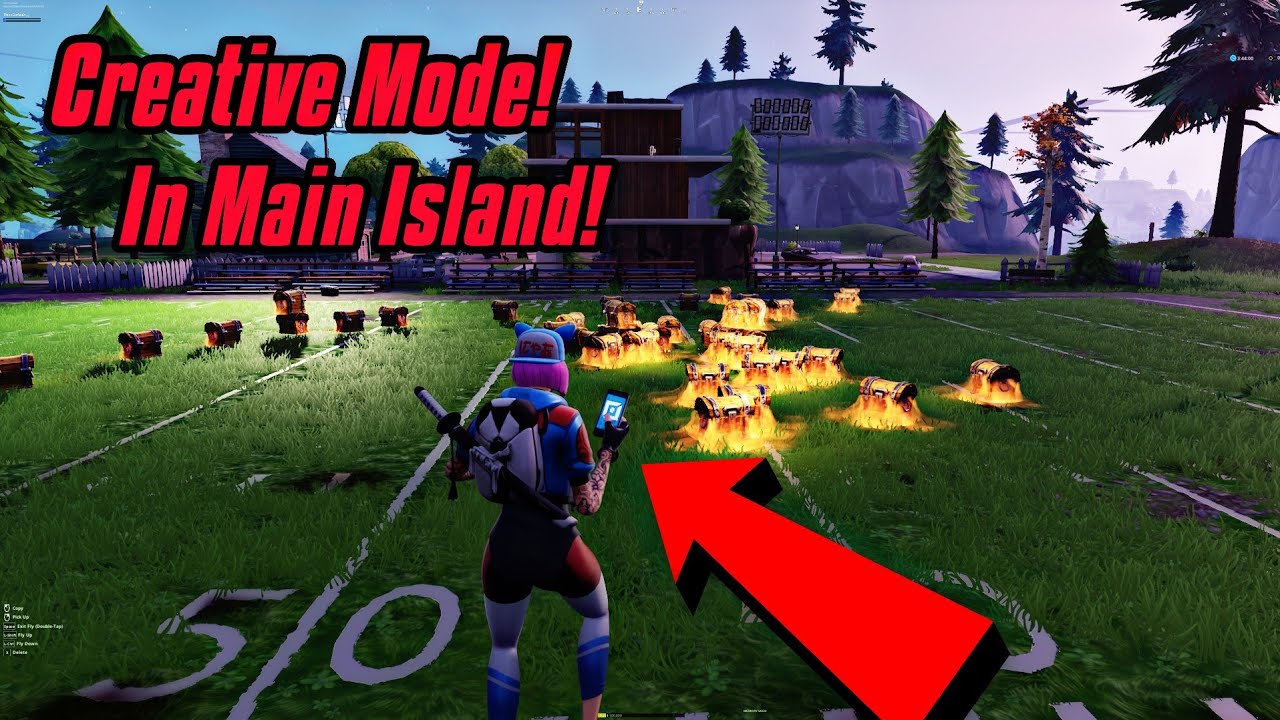
Fortnite Creative gives you a private island where you can build games, race tracks, puzzles, and entire worlds using a library of assets. You can invite friends to play your creations or explore thousands of community-made maps, from obstacle courses to full RPGs. It is essentially a game-creation sandbox inside the game itself.
Seasonal Updates and Battle Pass
Each season introduces new map changes, weapons, vehicles, and crossover characters from movies, comics, and other games. The Battle Pass offers cosmetic rewards that you unlock by playing, giving you long-term goals to chase over weeks. Seasons typically run for several months, so there is always something new to explore.
Cross-Platform Play
Fortnite supports cross-play across mobile, PC, console, and cloud streaming services. You can team up with friends regardless of what device they play on, and your progress, purchases, and cosmetics carry over through your Epic Games account. This means you can start a match on your phone and continue your progression on a console later.
Ranked and Competitive Modes
For players who want a serious challenge, Fortnite offers ranked playlists where you climb through divisions based on performance. Competitive tournaments and events run throughout the season, giving skilled players a path to recognition and rewards beyond casual play.
App Screenshots


Step-by-Step Tutorial
If you are new to Fortnite, here is how to go from installing the game to surviving your first match:
- Install and sign in - Get the game from your device's app store or the official site, then sign in with or create an Epic Games account.
- Customize your character - Visit the Locker tab to pick an outfit, back bling, pickaxe, and emotes. Many cosmetics are free or unlockable through the Battle Pass.
- Choose a mode - From the lobby, select Solo, Duo, or Squad. If you are playing with friends, invite them to your party first.
- Drop and loot - When the match starts, watch the Battle Bus path on the map. Pick a landing spot away from the bus path for fewer early fights, or drop into a named location for better loot.
- Practice building - In your first matches, focus on harvesting materials and practicing basic walls and ramps. Building speed comes with repetition.
- Track the storm - Always check the minimap for the storm circle. Plan your rotation early so you are not caught in the storm while fighting.
- Engage or evade - Decide whether to fight based on your loadout and position. Sometimes avoiding a fight is smarter than winning one.
- Review and repeat - After each match, think about what worked and what did not. Improvement comes from recognizing patterns across matches.
Use Cases
- Casual gaming sessions - Drop into a quick match during a break for 15 to 20 minutes of action without a long commitment.
- Playing with friends - Squad up with three friends across different devices and coordinate via voice chat for a shared social experience.
- Creative building practice - Spend time in Creative mode practicing building drills, editing, and aim courses without the pressure of a live match.
- Ranked progression - For competitive players, climbing the ranked ladder provides a structured goal and measurable progress over a season.
- Exploring community content - Browse featured Creative maps to play community-made games, from parkour challenges to role-playing experiences.
- Attending live events - Fortnite hosts in-game concerts, story events, and crossover premieres that draw millions of simultaneous players.
Tips & Tricks
- Land smart - Choose landing spots with good loot density but manageable traffic. Popular spots mean more early fights and shorter matches.
- Always carry shields - Small and large shield potions are essential. Prioritize getting full shield before engaging in fights.
- Warm up in Creative - Spend five to ten minutes in an aim or edit course before jumping into competitive matches. It makes a real difference.
- Learn to edit fast - Editing walls and ramps quickly is a core skill. Practice in Creative mode until it becomes muscle memory.
- Use sound cues - Footsteps, chest sounds, and gunfire direction are critical. Play with headphones to get every audio advantage.
- Manage your inventory - Keep a balanced loadout: assault rifle, shotgun, SMG or sniper, shields, and utility items. Avoid carrying duplicates you do not need.
- High ground wins - In build fights, getting above your opponent gives you a significant advantage. Practice taking the high ground quickly.
Pros & Cons
Pros
- Free to play with no pay-to-win mechanics. All purchases are cosmetic only.
- Cross-platform play means you can play with friends on any device.
- Frequent seasonal updates keep the game fresh with new content, map changes, and crossovers.
- Creative mode offers endless community content and a sandbox for building your own games.
- Strong competitive scene with ranked modes and regular tournaments.
Cons
- The mobile experience can be demanding on older devices, with large storage requirements and potential performance issues.
- Building mechanics have a steep learning curve, which can feel overwhelming for new players.
- Touch controls are less precise than keyboard, mouse, or controller, putting mobile-only players at a disadvantage in cross-play lobbies.
- Matchmaking in cross-play lobbies can pit mobile players against PC or console opponents.
- The game requires a stable internet connection at all times, with no offline mode available.
Alternatives / Comparison
| Game | Core difference | Best for |
|---|---|---|
| PUBG Mobile | Realistic military shooter with no building mechanics | Players who prefer tactical, grounded gunplay |
| Call of Duty: Mobile | Fast-paced FPS with both BR and multiplayer modes | Fans of Call of Duty style gunplay and loadouts |
| Free Fire | Lighter battle royale with shorter matches and smaller lobbies | Players with budget devices or limited time |
| Fortnite | Battle royale with building, creative sandbox, and cross-play | Players who want building depth and creative freedom |
FAQs
Is Fortnite free to play?
Yes, Fortnite is free to play. The core battle royale and creative modes are free, and all in-game purchases are cosmetic only. There is no pay-to-win element.
Can I play Fortnite on mobile with friends on PC or console?
Yes. Fortnite supports full cross-platform play. You can squad up with friends on PC, PlayStation, Xbox, Nintendo Switch, and cloud streaming services through your Epic Games account.
Does Fortnite require an internet connection?
Yes, Fortnite is an always-online game. You need a stable internet connection for all modes, including creative practice and browsing community maps.
What are the system requirements for Fortnite on mobile?
Fortnite requires a relatively modern device with decent RAM and storage space. The game is graphically demanding, so older or budget devices may experience lag or reduced frame rates. Check the official compatibility list before installing.
Is building necessary to enjoy Fortnite?
Building is a core mechanic, but you can enjoy the game at a casual level without mastering advanced techniques. Fortnite also offers Zero Build modes that remove building entirely, focusing purely on gunplay and positioning.
Are in-game purchases required to win?
No. All purchases in Fortnite are cosmetic. Skins, emotes, and the Battle Pass only provide visual customization. Gameplay-affecting items are earned through play, not payment.
What is the Fortnite Battle Pass and is it worth it?
The Battle Pass is a seasonal progression system that rewards you with cosmetic items as you play. If you play regularly during a season, it offers good value because it provides enough in-game currency to fund the next pass if you complete it.
Conclusion
Fortnite stands out in the crowded battle royale space because it is more than just a shooter. The building system adds a layer of creativity and skill expression that no other battle royale matches, and the Creative mode turns the game into a platform for user-generated content. Seasonal updates keep the experience fresh, and cross-platform play means your friends are never left out. If you enjoy competitive games with room for creativity and social play, Fortnite is well worth your time. Install it, drop in, and see how long you can survive.
Safety Note and Disclaimer
Our website is a third-party distribution and information site, not the official app store or the app developer.
Download only from a source you trust and verify the source.
Review the permissions the app requests and decline anything that looks excessive.
Keep your device's security settings and antivirus up to date.
Prefer official stores (Google Play) when the app is available there.
This article is an independent overview and is not affiliated with the app's developer.